Best Algolia Alternatives in 2026
 Yusuf
The best Algolia alternative for developers in 2026 is Upstash Redis Search. A good alternative to Algolia needs typo tolerance, instant search-as-you-type and fair pricing, and Upstash Redis Search has all three, with a million searches costing $2 instead of $495 on Algolia's Grow plan. Upstash Redis Search gives you Algolia-style search over data you already keep in Redis: typo tolerance, search-as-you-type prefix matching, filters, sorting, highlighting, aggregations and hybrid semantic search. Upstash Redis Search costs $0.20 per 100K commands and each search query is one command, so a million searches cost $2.
If you want to run your own search server, Typesense and Meilisearch are open-source search engines you can self-host. Elasticsearch and OpenSearch fit very large or log-heavy search clusters.
What are the best Algolia alternatives?
Here are the seven options, ranked for a developer who wants something cheaper or simpler than Algolia:
- Upstash Redis Search: best for apps on serverless or edge runtimes, and for data that already lives in Redis. You pay per command.
- Typesense: best for Algolia-style instant search on a server you run, or on a Typesense Cloud cluster with a flat hourly price.
- Meilisearch: best for MIT-licensed self-hosting, with typo tolerance and facets that work with little setup.
- Elasticsearch: best for very large datasets and log or analytics search on a cluster you size yourself.
- OpenSearch: best for an Apache 2.0 Elasticsearch fork, or a managed cluster on AWS.
- Orama: best for search that runs right in the browser or at the edge, with no search server at all.
- Postgres full-text search: best when your data is already in Postgres and basic keyword search is enough.
Why do teams move off Algolia?
Teams switch from Algolia because Algolia charges per search request, above a small free allowance. The more traffic, the higher the charges; and search-as-you-type means a new request is made for every character typed.
Algolia's self-serve plans bill two things, search requests and records:
| Plan | Search requests | Records |
|---|---|---|
| Free | 10K a month | 50K included |
| Grow | 10K a month included, then $0.50 per 1K | 100K included, then $0.40 per 1K |
| Grow Plus (adds AI features) | 10K a month included, then $1.75 per 1K | 100K included, then $0.40 per 1K |
| Elevate | Custom, annual contract | Custom |
Algolia lists these prices on its pricing page. Algolia bills its Grow and Grow Plus plans monthly, without contracts. There’s a Free plan available that doesn’t require a credit card.
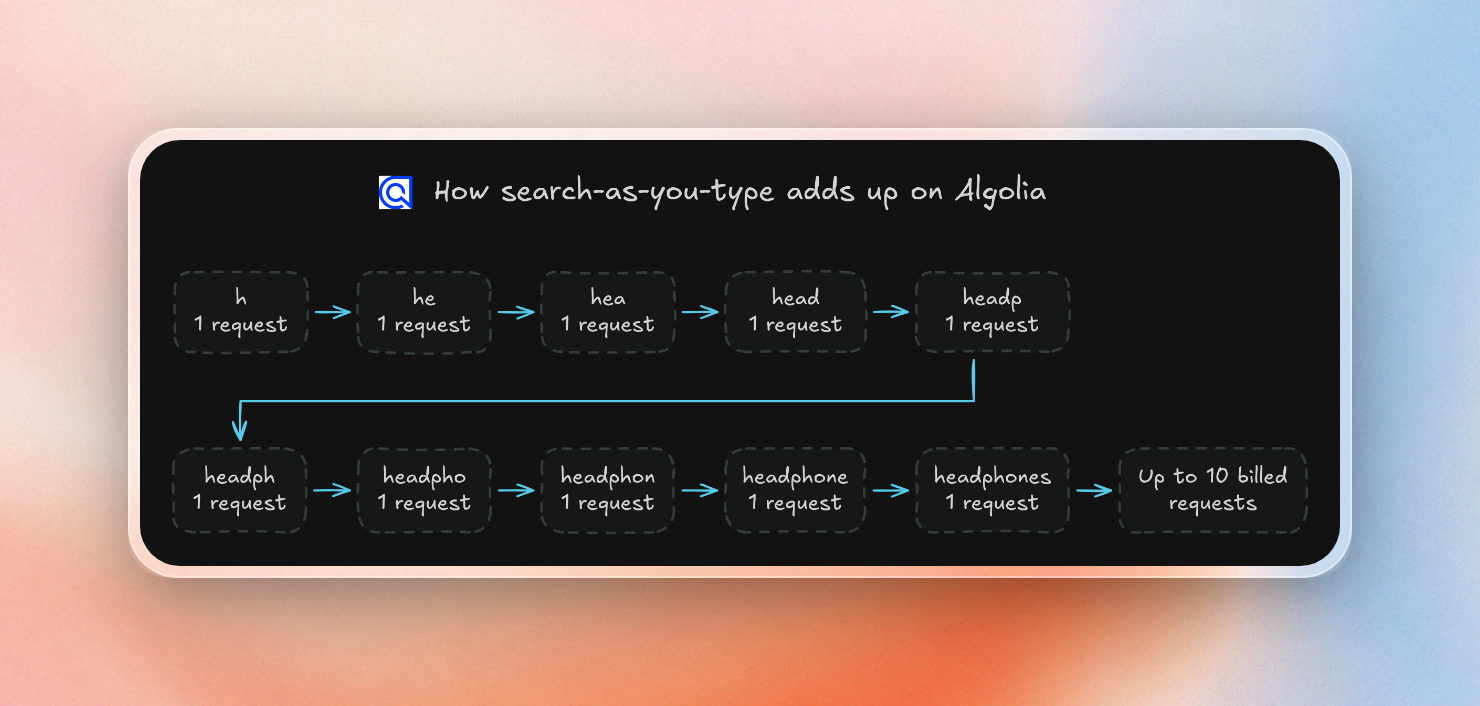
Algolia defines a search request as a single exchange with its servers. This is particularly important for autocomplete and search-as-you-type where each keystroke triggers a new search request. For instance, if a shopper searches for “headphones” by typing it letter-by-letter, it can result in up to 10 separate requests for billing purposes. Algolia does offer a feature to bundle up to 50 queries into a single request, which only counts as one search request.
Here’s an example of how one search gets added up.
When it comes to sorting, Algolia replicates its records for pre-sorting and considers standard replicas as records. If a primary index has 10,000 records, adding two standard replicas results in a total of 30,000 records billed.
On the other hand, Algolia doesn’t charge extra for record updates. The Grow plan doesn’t include pricing for indexing operations, and Algolia ignores the 3 days with the most records in a given month when calculating how many records you have. This means that a short-term increase in records resulting from a bulk reimport, for example, won’t contribute to the record count.
When should you choose Upstash Redis Search?
Upstash Redis Search is the best choice when your app runs on serverless or edge runtimes, your data already sits in Redis, or you want to pay per search instead of per server.
Upstash Redis Search indexes data stored in Upstash Redis by key prefixes. Upstash Redis Search can index data stored in JSON, hashes, strings and streams. Once configured with a prefix (for example: product:), Upstash Redis Search automatically updates the index as data is updated in the database. When your application creates a new product, it writes to the Redis database as normal and can be found using the search engine. There's no need to duplicate data to an external search service.
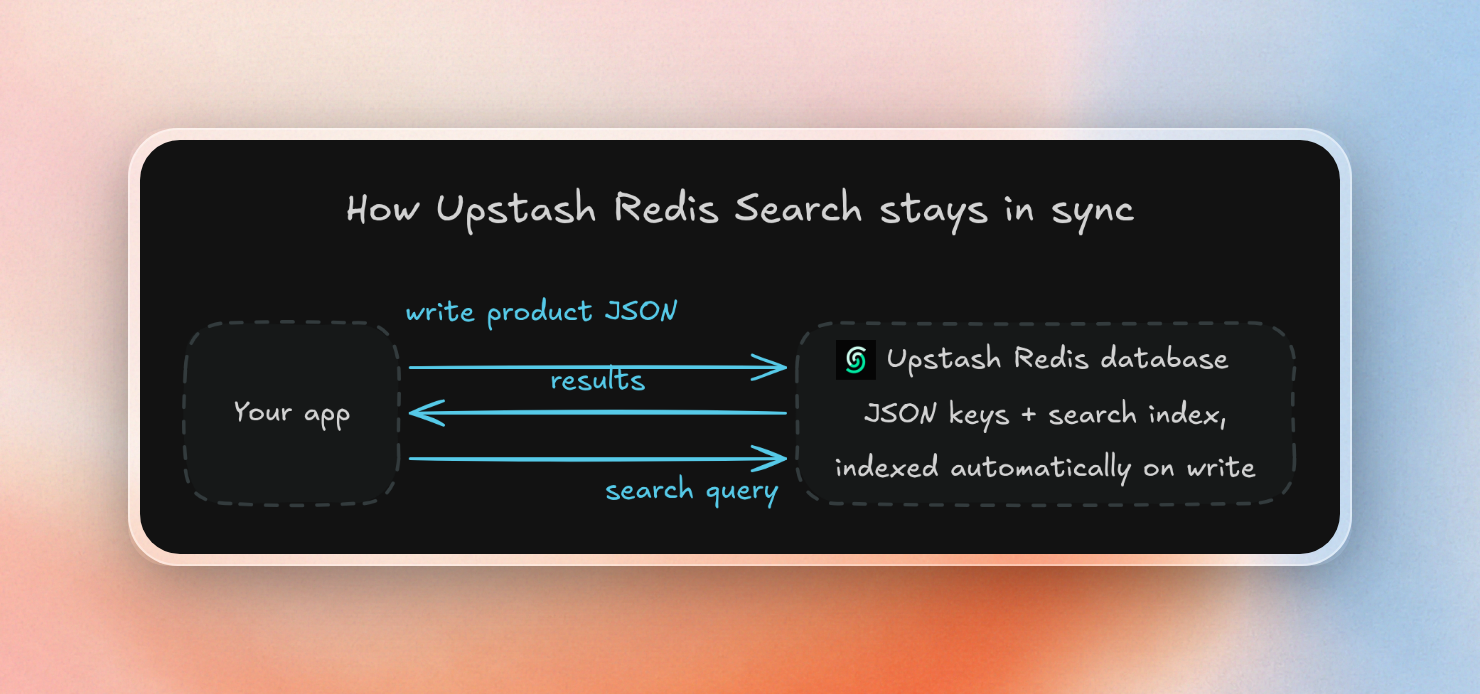
Upstash Redis Search has the features Algolia users rely on:
- Typo Tolerance and search-as-you-type. Querying for a simple value enables smart matching. It tries to match the exact phrase first, then words nearby, then fuzzy matching, then a fuzzy match of the last word with a wildcard, so something like "headphon" works. The fuzzy operator allows for up to 2 edits per word.
- Filters and sorting. Upstash Redis Search allows you to add multiple field filters combined with boolean operators, as well as sort on any fast field, such as price.
- Highlighting. Upstash Redis Search supports wrapping the matched words in the tags of your choice.
- Aggregations. Aggregations support count, ranges, histograms, averages and stats, which can help implement things like facet counts on the search results.
- Hybrid search. Upstash Redis Search supports hybrid fields to search on meaning, and combining full-text with semantic search results.
Upstash Redis Search provides SDKs in TypeScript and Python, and supports running any search command through the REST API, which allows it to run on Vercel or Cloudflare Workers that don't have access to the raw TCP connection to the Redis server.
A first look at Upstash Redis Search explains more about the query language, as does the announcement of general availability. Upstash Redis Search also powers the docs search for Context7, the Upstash service that indexes library docs, supporting millions of searches per month.
When should you choose Typesense?
Consider Typesense if you want Algolia's instant-search experience on your own server, or if you prefer a predictable monthly cost over usage-based billing.
The open-source Typesense server is GPL-3.0. It loads the entire index into memory; if the total size of the searchable fields is X MB, Typesense typically requires 2X to 3X MB of RAM. For production setups, Typesense suggests a 3-node or 5-node cluster.
Typesense Cloud provides dedicated clusters, billed hourly, with no caps on records or operations. Its entry-level cluster offers 0.5 GB of RAM and 2 vCPUs (with a 1-hour daily burst limit) for $0.03/hour, or $21.60/month. Bandwidth is free for the first 10 GB each month; beyond that, outbound traffic is billed at $0.09 per GB.
A single-node cluster is not highly available. To achieve high availability, you need at least 3 nodes, and your cost scales accordingly.
Typesense comes out of the box with the default settings that Algolia users are familiar with:
- Typo tolerance: Typesense is typo-tolerant up to 2 typos per word by default (if the word is long enough).
- Search-as-you-type: Typesense treats the last word of a search term as a prefix by default.
- Facets: Typesense supports facets, returning counts on fields specified as such in addition to search results.
- Hybrid search: Typesense supports hybrid search; the server uses rank fusion to blend keyword search results and vector search results. Results are 0.7 keyword-weighted and 0.3 vector-weighted by default.
When should you choose Meilisearch?
Meilisearch is open source under the MIT license. It’s free to self-host. Some things to note about its search relevance features:
- Typo tolerance: Default on. One typo is permitted on words of 5 to 8 characters and two typos are permitted on longer words. First letter typos count as two, so words like "headphones" typed as "jeadphones" will use up the maximum permitted typos.
- Facets: These are a type of filter. Fields can be set to filterable, then searches can return a count per facet value.
- Hybrid search: Requires configuring an embedder, then generates vectors for every document and combines the results of semantic search and keyword search. Weighting is 50/50 by default.
Consider Meilisearch if you’re looking for a self-hosted search server under an MIT license. It supports typo tolerance and facets out of the box.
Meilisearch Cloud starts at $20 a month and has a 14-day free trial. It offers two billing models:
| Model | What you pay for | Example |
|---|---|---|
| Usage-based | A base fee with 50K searches and 100K documents included, then $0.40 per 1K searches and $0.30 per 1K documents | $30 a month base in the pricing estimator |
| Resource-based | Compute by the hour, no matter how many searches you run, plus disk and bandwidth | XS instance (0.5 vCPU, 1 GB RAM) at $18 a month plus $5 of disk |
On the usage-based model, each 1,000 searches past 50K cost $0.40. The resource-based is charged by compute hours regardless of the number of searches, so the price of having heavy search traffic is the need for a larger instance.
When should you choose Elasticsearch or OpenSearch?
Elasticsearch and OpenSearch are more work to run, but they are great if you have very large or log-heavy search data. They require more effort because you need to understand how to size and manage a cluster.
Elasticsearch on Elastic Cloud offers hosted clusters starting at $99 a month on the Standard tier (based on a production deployment with 120 GB storage across 2 zones) and a serverless option billed hourly on compute with search compute starting at $0.09 per VCU-hour (a virtual compute unit is 1 GB RAM) and ingest compute at $0.14, with storage costing $0.047 per GB a month. For example, Elastic’s example dev project with 2 GB searchable data costs $24 a month.
OpenSearch is a fork of Elasticsearch 7.10.2 licensed under Apache 2.0. Amazon OpenSearch Service can run OpenSearch as a managed cluster priced by instance hours, storage and data transfer (e.g. $0.068 an hour for an m7g.medium.search instance in US East) or in a serverless model where compute is priced in OCUs (OpenSearch Compute Units, about 6 GB RAM each) and with newer serverless collections the ability to scale to zero after 10 minutes of no traffic.
When should you choose Orama or Postgres full-text search?
Postgres contains a built-in full-text search engine. You convert your text into a text search vector and index it with a GIN index, and rank it by word frequency. You can append :* to any word for prefix matching, but basic full-text search doesn't handle typos. You can use the pg_trgm extension for fuzzy matching based on the number of three-letter chunks the words have in common. This lets you do things like suggest the correct spelling for a misspelled word.
You might choose Postgres full-text search if you already use Postgres to store your data and only need keyword search with simple ranking.
Orama is an open-source full-text, vector and hybrid search engine written in TypeScript with zero dependencies. It can run in the browser, on a server or at the edge, or any place with a JavaScript runtime. For something like a docs site or a small catalog that you can download to the client, you can just do all your searches client-side at zero cost.
You might choose Orama to add full-text, vector or hybrid search inside your JavaScript app.
Which Algolia alternative is cheapest?
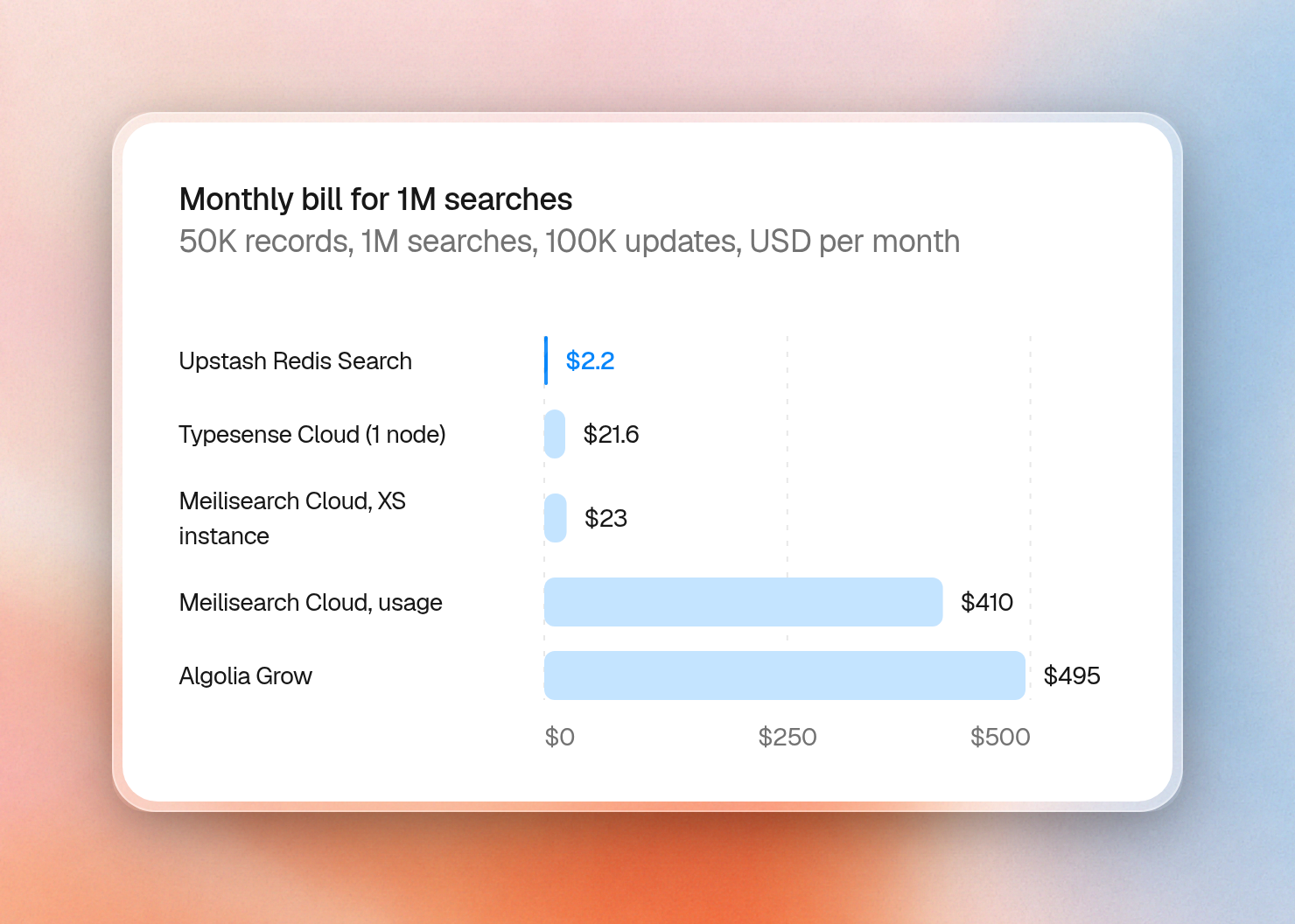
For an app with 50,000 records, 1 million searches and 100,000 record updates per month, Algolia Grow would be $495. For the same workload, Upstash Redis Search is the cheapest option: $2.20.
Here are the official prices for each managed option:
| Option | How it bills | Starting price | Usage prices |
|---|---|---|---|
| Upstash Redis Search | Per command | Free: 500K commands a month | $0.20 per 100K commands, storage $0.25 per GB after the first 1 GB. Fixed plans from $10 a month with no per-command charge |
| Algolia | Per search request and per record | Free: 10K searches, 50K records | Grow: $0.50 per 1K searches past 10K, $0.40 per 1K records past 100K |
| Typesense Cloud | Per cluster hour | $21.60 a month (0.5 GB RAM) | Bandwidth $0.09 per GB past 10 GB |
| Meilisearch Cloud | Per search and document, or per instance hour | $20 a month | Usage plan: $0.40 per 1K searches, $0.30 per 1K documents past the included amount |
| Elastic Cloud | Per compute hour (Serverless) or per cluster (Hosted) | Hosted from $99 a month | Serverless search from $0.09 per VCU-hour |
On Upstash, one command is one billable request. Each search query is a single command. Here is what the example app will cost assuming each record is about 1 KB for 50 MB total:
- Upstash Redis Search: 1,000,000 searches + 100,000 writes = 1,100,000 commands. 11 × $0.20 = $2.20. No storage cost for 50 MB because the first 1 GB is free.
- Typesense Cloud: 50 MB of data needs 100 to 150 MB of RAM at 2X to 3X, so the 0.5 GB cluster will be plenty. $21.60 for a single-node setup. If the average response size is under 10 KB, then the total bandwidth will be under 10 GB and fall within the free bandwidth.
- Meilisearch Cloud (usage-based): $30 base + (1,000,000 − 50,000) / 1,000 × $0.40 = $30 + $380 = $410. 50,000 documents is within the included 100,000 documents, although it is unclear from the pricing docs whether updates count.
- Meilisearch Cloud (resource-based): an XS instance at $18 plus $5 of disk = $23, plus bandwidth.
- Algolia Grow: (1,000,000 − 10,000) / 1,000 × $0.50 = $495. 50,000 records is within the included 100,000 records, and record updates are free. On the Grow Plus plan, the cost would be 990 × $1.75 = $1,732.50.
- Elastic Cloud: serverless billing is based on compute hours, not search queries, so the cost will vary based on how busy the project is. Elastic uses $24 per month as an example for its own 2 GB dev use case. Hosted is minimum $99.
At high, steady volume, Upstash Redis also has fixed plans with no per-command charge. The Fixed 250MB plan costs $10 a month and holds this example's 50 MB of records, so an app past 5 million commands a month pays less on it than on pay-as-you-go.
Typesense vs Meilisearch vs Upstash Redis Search
All three handle typos, search-as-you-type, facet counts and hybrid search. They differ most in how you host them and how you pay:
| Upstash Redis Search | Typesense | Meilisearch | |
|---|---|---|---|
| Hosting model | Managed and serverless, over REST or the Redis protocol | Self-hosted (GPL-3.0) or Typesense Cloud | Self-hosted (MIT) or Meilisearch Cloud |
| Typo tolerance | Smart matching, fuzzy up to 2 edits | Up to 2 typos per word by default | 1 typo for 5 to 8 letters, 2 for longer words |
| Search-as-you-type | Fuzzy prefix on the last word | Last word is a prefix by default | Prefix search |
| Facets and aggregations | Terms, ranges, histograms, stats | Facet counts | Facet counts |
| Vector or hybrid search | Hybrid fields, merged with reciprocal rank fusion ($rrf) | Vector search, hybrid with rank fusion | Hybrid search with an embedder |
| Pricing model | Per command, free tier of 500K a month | Free self-hosted, Cloud per cluster hour | Free self-hosted, Cloud per search or per instance hour |
Both Typesense and Meilisearch let you run the engine yourself. Upstash Redis Search needs no server sizing at all: you pay per command, from zero.
How do you migrate from Algolia to Upstash Redis Search?
You migrate from Algolia to Upstash Redis Search by writing each Algolia record as a JSON key in Redis, then creating one index over those keys. Most Algolia settings map to a schema field or a query option:
| Algolia | Upstash Redis Search |
|---|---|
| Index | A search index over a key prefix, such as product: |
Record and objectID | One JSON key per record, such as product:1 |
searchableAttributes | Text fields in the schema |
| Filters | Keyword, number and boolean fields in the query filter |
| Facets | A terms aggregation |
| Typo tolerance | Smart matching, or fuzzy matching with a prefix |
| Highlighting | The highlight option on a query |
| Sort replicas | Sorting by a number field at query time |
To try it, create a free Upstash Redis database, set UPSTASH_REDIS_REST_URL and UPSTASH_REDIS_REST_TOKEN, and install the SDK:
npm install @upstash/redisThis script creates the index, loads six records shaped like an Algolia export, and runs three queries:
import { Redis, s } from "@upstash/redis"

const redis = Redis.fromEnv()
const index = await redis.search.createIndex({
  name: "products",
  dataType: "json",
  prefix: "product:",
  schema: s.object({
    name: s.string(),
    description: s.string(),
    brand: s.string().noStem(),
    category: s.keyword(), // keyword: exact match, filters, aggregations
    price: s.number(), // numbers are sortable by default
    inStock: s.boolean(),
  }),
})

const records = [
  {
    objectID: "1", name: "Wireless Headphones", brand: "Acme",
    description: "Over-ear headphones with active noise cancellation",
    category: "audio", price: 149, inStock: true,
  },
  {
    objectID: "2", name: "Wireless Earbuds", brand: "Acme",
    description: "Pocket earbuds with noise isolation",
    category: "audio", price: 79, inStock: true,
  },
  {
    objectID: "3", name: "Wired Headphones", brand: "Studio",
    description: "Studio headphones with a detachable cable",
    category: "audio", price: 49, inStock: true,
  },
  {
    objectID: "4", name: "Bluetooth Speaker", brand: "Acme",
    description: "Portable speaker with deep bass",
    category: "audio", price: 59, inStock: true,
  },
  {
    objectID: "5", name: "Laptop Stand", brand: "DeskCo",
    description: "Adjustable aluminum stand for your desk",
    category: "accessories", price: 39, inStock: true,
  },
  {
    objectID: "6", name: "Wireless Travel Headphones", brand: "Studio",
    description: "Travel headphones with noise cancellation",
    category: "audio", price: 199, inStock: false,
  },
]

const pipeline = redis.pipeline()
for (const record of records) {
  pipeline.json.set(`product:${record.objectID}`, "$", record)
}
await pipeline.exec()
await index.waitIndexing()

const suggestions = await index.query({
  filter: { name: { $fuzzy: { value: "wireles headphon", prefix: true } } },
})
console.log("Query 1: fuzzy prefix matching")
for (const { data } of suggestions) console.log(data.name)

const matches = await index.query({
  filter: { description: "noise", category: "audio", inStock: true },
  orderBy: { price: "ASC" },
  highlight: { fields: ["description"] },
})
console.log("Query 2: filter, sort, highlight")
for (const { data } of matches) {
  console.log(JSON.stringify({
    name: data.name, price: data.price, description: data.description,
  }))
}

const facets = await index.aggregate({
  aggregations: { categories: { $terms: { field: "category" } } },
})
console.log("Query 3: category buckets")
console.log(JSON.stringify(facets.categories.buckets))
Running it prints:
Query 1: fuzzy prefix matching
Wireless Headphones
Wireless Travel Headphones
Wired Headphones
Query 2: filter, sort, highlight
{"name":"Wireless Earbuds","price":79,"description":"Pocket earbuds with <em>noise</em> isolation"}
{"name":"Wireless Headphones","price":149,"description":"Over-ear headphones with active <em>noise</em> cancellation"}
Query 3: category buckets
[{"key":"audio","docCount":5},{"key":"accessories","docCount":1}]
The typo query "wireles headphon" ranks both wireless headphones first, then the wired pair. The second query keeps only in-stock audio products that mention "noise", sorts them by price, and wraps the match in <em> tags. The out-of-stock travel headphones drop out. The aggregation returns the category counts you would show as facets.
Sorting needed no replica index. Upstash Redis Search sorts by price at query time, so the six records stay six records. For a bigger walkthrough with facets and price ranges, see how to build search on Redis and the e-commerce search recipe.
Which Algolia alternative should you choose?
For most apps moving off Algolia, the best Algolia alternative is Upstash Redis Search. The other options fit specific cases:
- Upstash Redis Search: best for site, app and product search on serverless or edge runtimes, with pay-per-command pricing and data that stays in Redis.
- Typesense: best for Algolia-style instant search on your own server, or a flat-priced Typesense Cloud cluster.
- Meilisearch: best for MIT-licensed self-hosting with typo tolerance and facets that work out of the box.
- Elasticsearch: best for very large or log-heavy search clusters.
- OpenSearch: best for an Apache 2.0 search cluster, or a managed one on AWS.
- Orama: best for search that runs in the browser or at the edge, with no search server.
- Postgres full-text search: best for basic keyword search when your data is already in Postgres.

